How to set a Christmas gift budget and stick to it
A simple way to plan Christmas gifts: set one total budget, list everyone, share the money out fairly and track each gift as you buy it. With a free gift budget planner that works in your currency.

Most gift budgets go wrong in the same way. You decide on a number in November, then buy one gift at a time, and each one feels reasonable on its own. Nobody adds them up until January, when the card statement does it for you.
The fix is to plan the total first and the gifts second. I built a free gift budget planner that does the adding up for you, and this post walks through the method behind it, step by step, with a real example.
Why gift budgets fall apart
There are usually two reasons. The first is that the budget is a feeling rather than a number per person, so there is nothing to check a single purchase against. The second is that people get added late: a colleague, a teacher, a neighbour, someone who sent you a gift first. Each extra person comes out of a total you never wrote down.
Writing down one total, then every person, and then what each person can have solves both. The rest is keeping count as you buy, which is the part a spreadsheet makes tedious and a phone makes easy.
Step 1: decide one total
Start with the amount you can pay in full without borrowing, and treat it as the ceiling for everything: gifts, wrapping and anything you post. It is easier to start lower and add later than to take money back from people you have already bought for.
In the planner you type this once. It picks your currency from your time zone, so a visitor in New York sees dollars and a visitor in Karachi sees rupees, and you can change it if you are buying in another currency. For the example in this post I used $1,500.
Step 2: list everyone, all at once
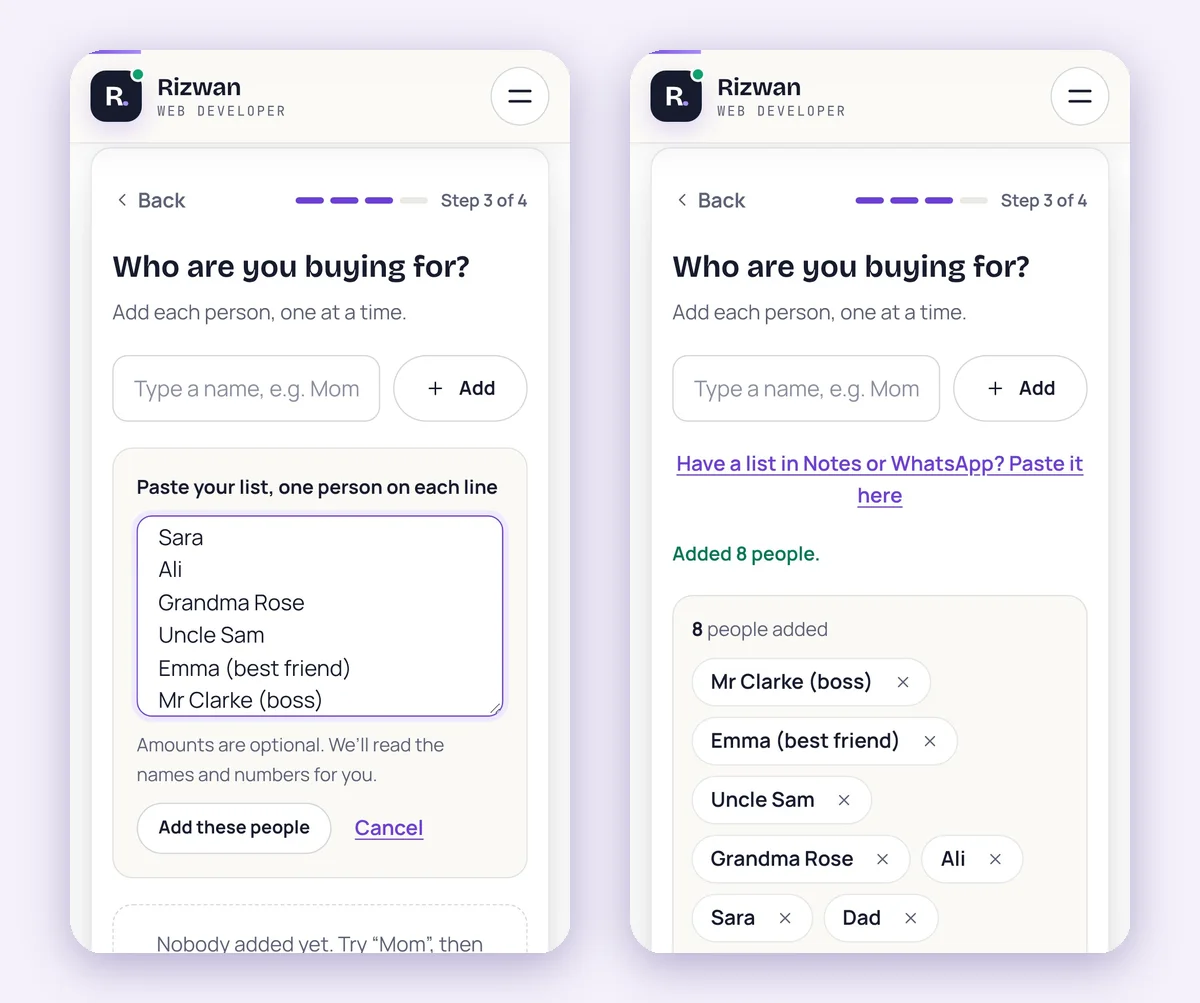
Write the whole list before you think about any gift. Family, friends, work, teachers, the Secret Santa at the office. If you already keep the list in WhatsApp or your phone’s notes, paste it in: every line becomes a person, and an amount on the same line, like “Mom $150”, sets a fixed budget for that person.
Step 3: share the money out
There are three fair ways to split a total, and the planner does the maths for each:
- Same for everyone. The simplest choice when everyone on the list is close to you in the same way.
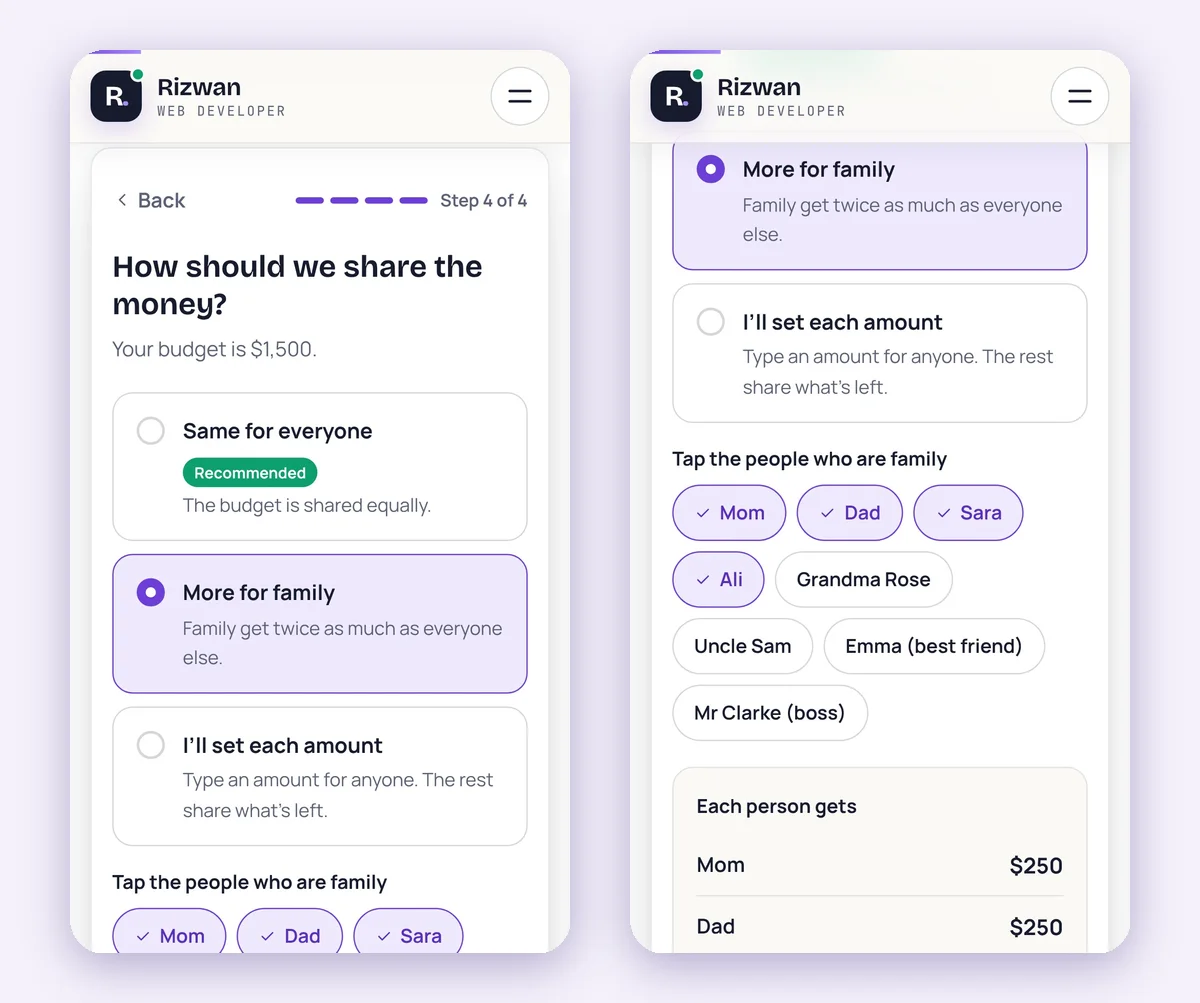
- More for family. Family get twice as much as everyone else. You tap the people who count as family.
- Your own amounts. Type an amount for anyone who needs one, and the rest share what is left.
In the example I chose more for family and tapped Mom, Dad, Sara and Ali. They get $250 each and the other four people get $125 each, which comes to exactly $1,500. The planner rounds to tidy numbers and always makes the shares add up to the total, so there is no stray $3 left over or missing.
Step 4: track every gift as you buy it
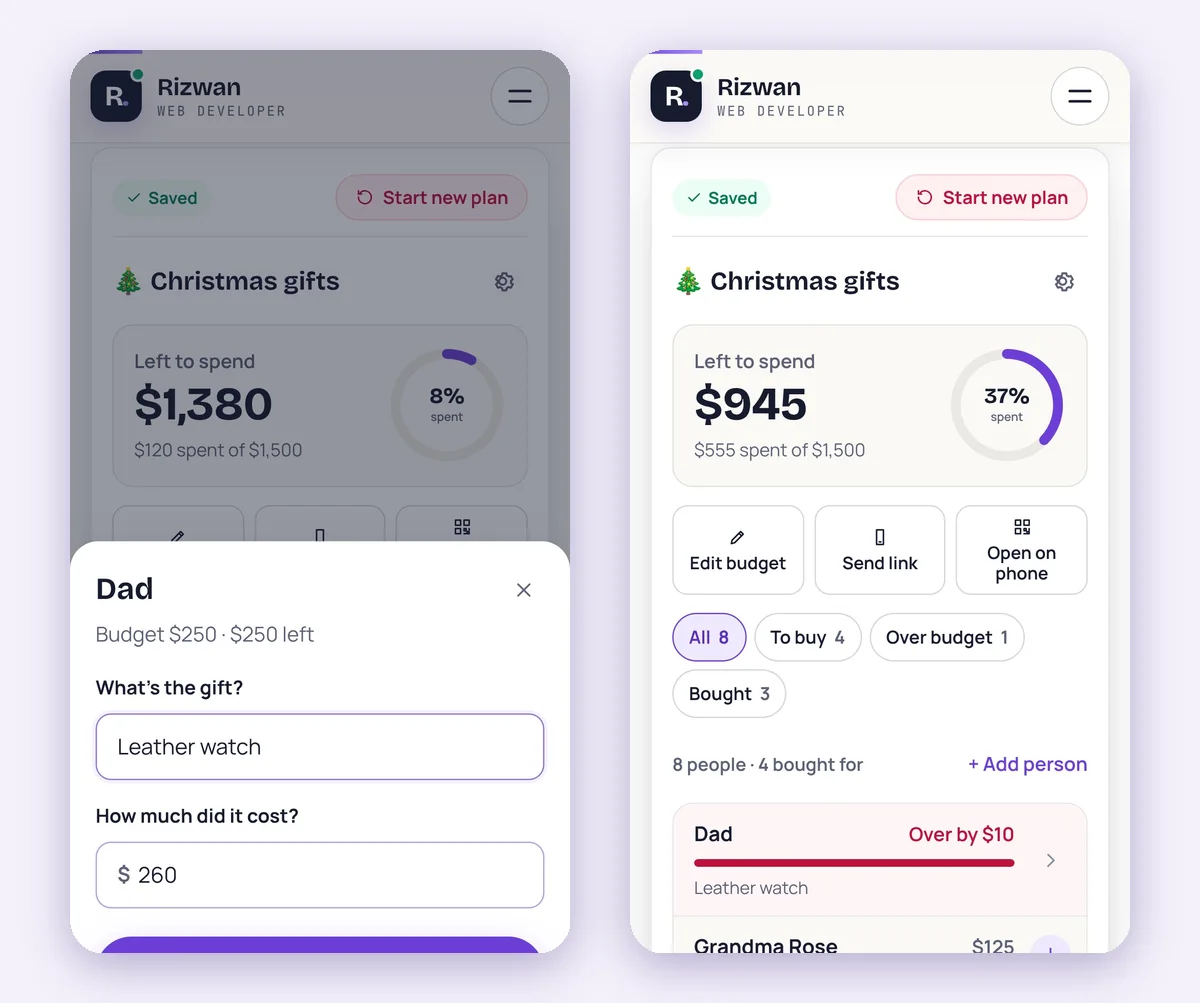
This is where a budget usually breaks, so make it as quick as possible. When you buy something, tap the person, type what it was and what it cost. The planner shows what is left for that person and for the whole plan, and the ring at the top fills up as you spend.
If a gift goes over someone’s share, the row turns red and says by how much. In the example, Dad’s leather watch cost $260 against a $250 share, so the planner shows “Over by $10”. That is the moment to decide: take $10 from someone else, or choose a cheaper gift next time, while you still can.
Take the plan shopping on your phone
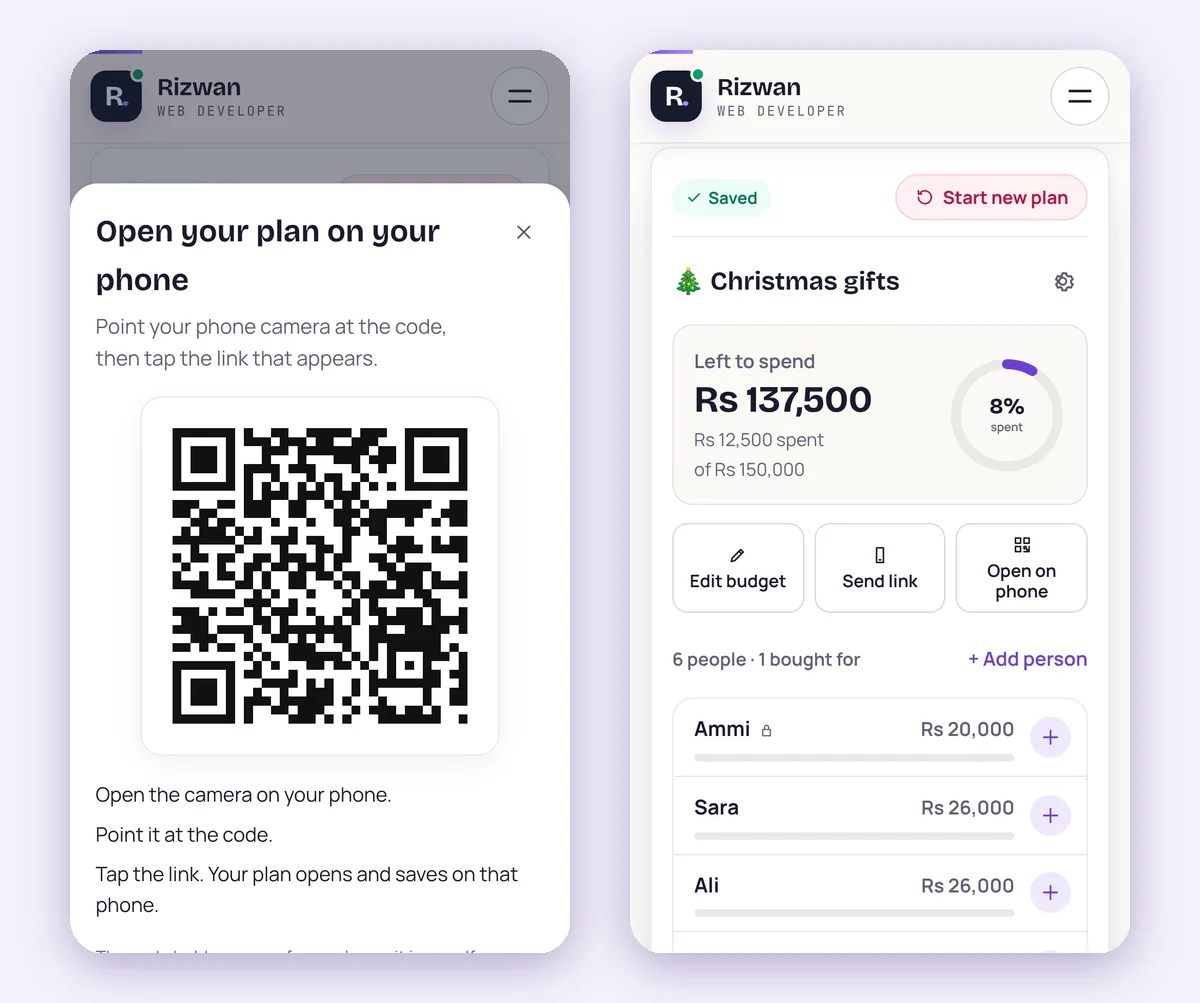
Most of the buying happens on a phone, in a shop or an app, so the plan should be there too. On a computer, tap Open on phone and scan the QR code with your phone camera. You can also send yourself a short link on WhatsApp or by email. The plan opens on the phone and is saved there as well.
The link is a copy of the plan as it is when you send it. If you change the plan later, the planner reminds you to send a new link.
It works in your currency
The planner has 17 currencies, including US, Canadian, Australian and New Zealand dollars, euros, pounds, UAE dirhams, Saudi riyals, Indian and Pakistani rupees and yen. The examples change with the currency too, so a dollar budget suggests $500 and a rupee budget suggests Rs 25,000. In the video, the same steps run with a Rs 150,000 budget, and a Rs 12,500 kurta for Abbu comes off the total exactly the way the watch did.
What happens to your list
There is no signup. The plan is saved in your browser on your device, so you can close the page and come back to it. When you share a link, your browser encrypts the plan first and only that encrypted copy is stored, for 90 days, after which it is deleted. The key that opens it is part of the link itself and never reaches the server, so only the people you send the link to can read it.
A few habits that keep the total intact
- Add people the moment they come up, even if you have not decided on a gift. A person with a share is a person you have budgeted for.
- Log a gift when you pay for it, not when you wrap it. Most overspending happens between the two.
- When someone goes over, move money from another person straight away instead of hoping it evens out.
- Download a backup in the planner once the list is final, or send yourself the link, so a cleared browser does not cost you the plan.
Tools like this on your own website
A free tool that people use every week of December brings them back to your site and gives them a reason to share it. If you run a store or a service business and want a fast custom website with its own calculators or planners, that is the work I do. See my WordPress development and Shopify development services, or get in touch.
Frequently asked questions
How much should I spend on Christmas gifts?
Spend what you can pay in full without borrowing, then divide it between the people on your list. Deciding the total first, and only then the gifts, is what keeps the number from growing.
How do I split a gift budget fairly?
Give everyone the same, give family more, or set amounts for a few people and share the rest. The free gift budget planner does any of the three and makes the shares add up exactly to your total.
Is the gift budget planner free?
Yes. There is no signup and no paid version. Your plan is saved in your browser on your device.
Can I use it in my own currency?
Yes. It picks your currency from your time zone and supports 17 currencies, including US dollars, euros, pounds and Pakistani rupees. You can change the currency at any time.
Can I see my plan on my phone and my laptop?
Yes. Scan the QR code or send yourself the short link, and the plan opens and saves on the other device too. A link is a copy of the plan at the time you send it, so send a new one after big changes.
Who can see my gift list?
Only you, unless you share a link. Shared plans are encrypted in your browser before they are stored, and only someone with the link can open them. Shared copies are deleted after 90 days.
Senior WordPress and Shopify developer with nine years of experience building and maintaining websites for businesses and agencies worldwide.
More about me